AI specialisation
AI Workflow Integration
Connect AI models to the systems you already use, so routine steps run on their own and people only review what matters.
In scope
- Workflow map and ROI estimate
- Integrations with your systems
- AI steps with guardrails
- Human review screen
- Logging and cost control
- Handover and training
Overview
What we do
Most teams do not need a new AI product. They need the AI they already pay for to work inside the tools they use every day: the CRM, the shared inbox, the spreadsheet that runs operations, the admin panel. AI workflow integration is the work of connecting a model such as OpenAI's GPT, Anthropic's Claude or Google's Gemini to those systems, giving it clear jobs and clear limits, and putting a person in the loop wherever money, customers or compliance are involved.
We design and build these workflows end to end. That means mapping how work moves today, choosing the steps where AI saves real time, building the integration in your own stack (Laravel, Node.js, n8n, Zapier or Make), and adding the logging and review screens that let you trust the result. You keep the code, the prompts and the data.
Where it helps
Real ways teams use ai workflow integration every day.
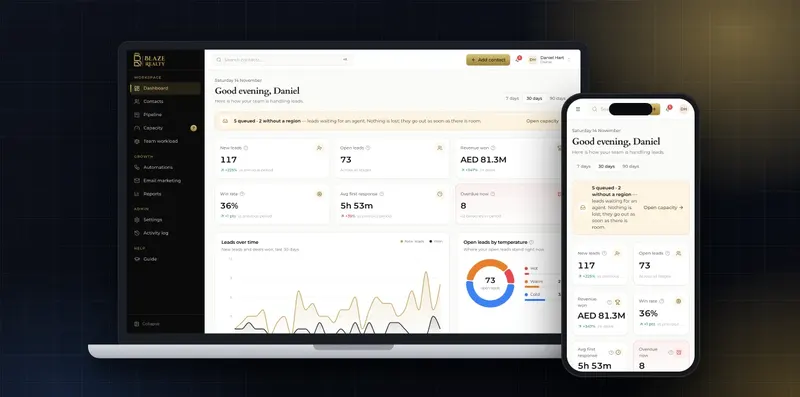
Explore AI Integration & Automation →- Lead capture and qualificationLeads from ads, forms and email are de-duplicated, scored and routed to the right person, with a summary of what the lead asked for. This is the same pattern we built into the Blaze Realty CRM.
- Inbox and ticket triageIncoming emails are classified, summarised and turned into tasks or replies drafted for a person to send.
- Document and data entryInvoices, forms and PDFs are read, checked and entered into your system, with uncertain fields sent for review.
- Reports and summariesDaily or weekly summaries of sales, support or operations, written from your own data and sent to the right people.
What you get
What we deliver
Workflow map and ROI estimate
A short written map of today's process, the steps we would automate, the steps that stay with people, and the expected hours saved per month.
Integrations with your systems
Secure connections to your CRM, inbox, database, accounting or ERP through their APIs or webhooks, built in your own codebase or a workflow tool.
AI steps with guardrails
Prompts, structured outputs (JSON), validation rules and fallbacks, so the model's answer is checked before anything is written to your systems.
Human review screen
A simple queue where your team approves, edits or rejects AI decisions that are uncertain or high-impact.
Logging and cost control
Every AI call logged with input, output, cost and outcome, plus limits that stop runaway spend.
Handover and training
Documentation, a walkthrough for your team and support after launch.
How we work
From first call to launch
-
1
Discovery call (free)
We learn your process, systems and goals, and tell you honestly whether AI is the right tool.
-
2
Workflow map
A written plan with the steps to automate, the review points, the tools and a fixed scope and price.
-
3
Build and test
We build in small steps on a staging copy, test with your real (anonymised) data and share progress weekly.
-
4
Launch with review on
We go live with human review switched on for every AI decision, then relax it as accuracy is proven.
-
5
Measure and improve
We track time saved, accuracy and cost, and tune prompts and rules from real results.
Toolkit
Technologies we use
Proof
Related work
Further reading
Guides on ai workflow integration
- AI Search on Your Own Documents: How RAG WorksRetrieval-augmented generation lets an AI answer questions using your own policies, manuals and contracts. Here is how it works and how to plan a reliable setup.
- Automating Invoices and Documents With AI: What Works TodayHow AI document processing reads invoices, receipts and forms today, where human review still matters and how to build a safe first workflow.
- What Is an AI Agent? A Plain-English Guide for Business OwnersA plain-English explanation of AI agents: how they differ from chatbots and automations, where they help today and how to start safely.
Who you work with
The people on this service



FAQ
Questions we often get
What is AI workflow integration?
It is connecting an AI model to your existing tools so it can do specific steps in a process, such as reading an email, summarising it, routing it or drafting a reply, with checks and a person reviewing uncertain results.
Do we need to replace our current software?
No. We integrate with the systems you already use through their APIs, webhooks or a workflow tool. Replacing software is only worth it when the current tool has no way to connect.
Which AI model do you use?
We choose per task: OpenAI, Anthropic Claude or Google Gemini, and sometimes a smaller or open-source model. You can switch models later because the integration is built around a clear interface.
Is our data safe?
We use providers' business APIs, send only the fields a step needs, keep logs in your own database and follow your data rules. For sensitive data we can mask or keep data in a specific region.
How long does a first workflow take?
A focused first workflow usually takes 2 to 4 weeks from discovery to launch. Larger multi-step workflows are planned in phases.
How do we know it is working?
Every AI step is logged, and we report hours saved, accuracy and AI cost after launch, so you can see the return.
Let's talk
Need help with ai workflow integration?
Tell us what you want to build. We reply with a clear plan, timeline and estimate.
More capabilities